


Not every old computer needs an SSD, more RAM, or a complete hardware overhaul to continue being useful.
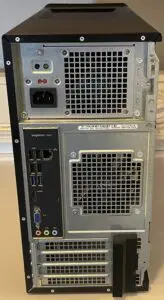
The Dell Inspiron 3847 is a good example. The goal was simple: clean the system, test the existing hardware, handle the basic Windows 10 housekeeping, and determine whether the machine remains useful for everyday tasks — the answer is yes.
The Hardware
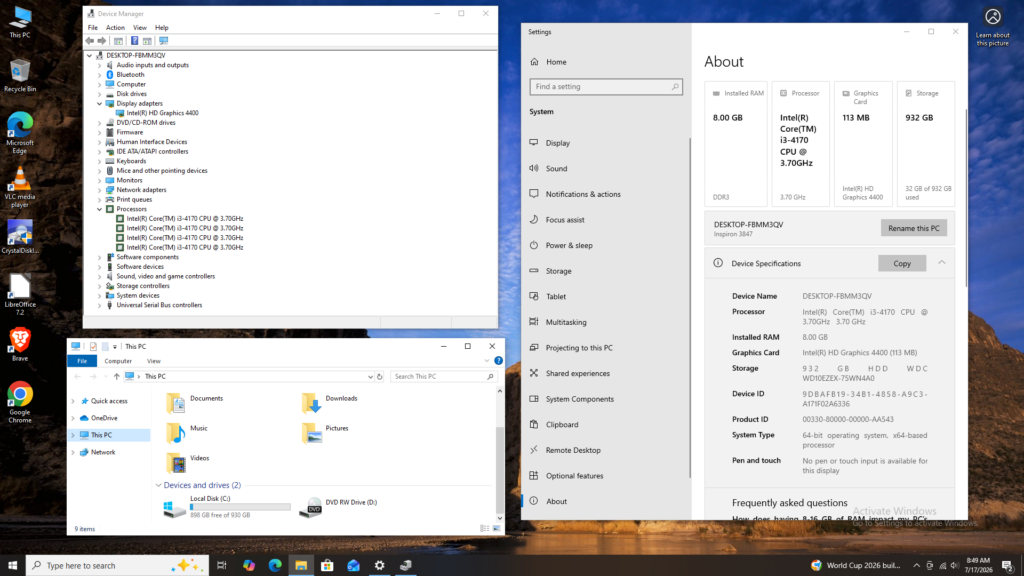
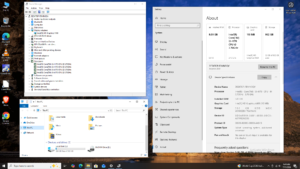
This Inspiron 3847 is equipped with:
- Intel Core i3-4170 — 3.7 GHz
- 8 GB DDR3 RAM
- Intel HD Graphics 4400
- 1 TB mechanical hard drive
- Windows 10
None of these specifications are impressive by today’s standards. Specifications only matter, however, in relation to the workload.
The intended uses are modest:
- Internet browsing
- Word processing
- WordPress work
- Basic streaming
- Older PC games
That is a very different workload from modern gaming, video editing, or other demanding applications.
For these basic tasks, there is no reason to automatically write the machine off.
First Job: Clean It Out
The first step was opening the case and removing the accumulated dust.
An old desktop can collect plenty of dust around the CPU heatsink, fans, ventilation openings, and power supply. This was not a cosmetic restoration. The objective was simply to remove debris that could restrict airflow and cooling.
Once cleaned, the system was reassembled and prepared for testing.
No parts were replaced.
No SSD. No RAM Upgrade.
This is deliberately not the usual “bring an old PC back to life” upgrade project.
- No SSD.
- No additional memory.
- The original 1 TB hard drive and 8 GB of DDR3 remain in place.
An SSD would make Windows considerably more responsive, and 8 GB is modest by current standards. Neither upgrade, however, is required for the intended workload.
The objective is to let the existing hardware do what it still can do, not how much money can be spent making it faster.
3.7ghz I3-4170 is Still a Useful Processor
The Core i3-4170 is a fourth-generation Haswell processor with two cores and Hyper-Threading, running at 3.7 GHz. It’s not a modern processor by any means, but age alone does not make it unsuitable for basic computing.
Word processing, ordinary web browsing, WordPress administration, email, and similar tasks remain well within its capabilities. The 1tb mechanical hard drive is more likely to be noticeable than the processor.
Intel HD 4400 Powered Graphics
Graphics are handled by the processor’s integrated Intel HD Graphics 4400, this is not a modern gaming GPU, but it does not need to be. Desktop graphics, video playback, streaming, and older games are reasonable workloads for this generation of integrated graphics.
Modern AAA gaming is obviously outside the target — older PC gaming is exactly where this hardware makes sense.
Testing the Hard Drive
Before cleaning up Windows or putting the system through its paces, the first step is checking the 1 TB mechanical hard drive.
An aging hard drive can remain reliable for years, but it is also one of the most likely components to fail in an older system. There is little point cleaning up Windows if the drive is already showing signs of trouble.
CrystalDiskInfo quickly checks drive health, temperature, power-on hours, and SMART data. The drive passed, so it was kept rather than replaced.
A computer does not need new hardware simply because it is old. An SSD would make the system more responsive, but a worthwhile upgrade is not the same as a necessary repair.
Fresh Windows Installation
Rather than trying to clean up an existing Windows installation, Windows 10 was reset from within the operating system using the “Keep nothing” option. This provides a clean installation without manually booting from installation media. Existing applications, settings, user accounts, and files are removed, leaving a fresh Windows installation on the existing 1 TB hard drive.
But, Why Not Linux?
Linux is also a viable option for hardware of this age. A lightweight Linux distribution could provide a more responsive experience, particularly with an older mechanical hard drive.
Windows was retained for a practical reason: many users are still unfamiliar with Linux. For a system intended to provide a familiar Windows experience, changing the operating system introduces an unnecessary learning curve.
Linux may be the better technical choice for some older hardware, but for this refurb, familiarity wins.
Reinstalling and Updating Windows 10
With Windows 10 selected as the operating system, the clean installation was completed and the system brought up to date.
The basic post-installation work included:
- Install available Windows updates.
- Check Device Manager for hardware problems.
- Verify the major hardware components are recognized.
- Use Snappy Driver Installer to identify and replace missing or outdated drivers.
- Run basic security checks.
- Reboot and verify normal operation.
With a clean Windows installation and the existing hardware left untouched, the system was ready for the actual test drive.
What Can It Actually Do?
- For internet browsing, the i3-4170 and 8 GB of RAM remain adequate for normal use, provided the browser is not overloaded with tabs and extensions.
- Word processing is essentially a non-issue. Ordinary documents require very little from this hardware.
- WordPress is also a reasonable workload. Writing posts, managing pages, uploading images, and routine site administration do not require a powerful computer.
- Basic streaming is within its capabilities, assuming continued browser and service compatibility.
- Old-school gaming, perhaps the most natural gaming role for this hardware. The Intel HD 4400 will not compete with a modern discrete GPU, but games from roughly 2013–2016, when this generation of hardware was current, can still be surprisingly playable.
That is enough for it’s intended purpose of being a low cost basic computer.
The Windows 10 Catch
There is one major consideration when refurbishing a machine like this in 2026: Windows 10 is no longer in normal support. Microsoft ended support for Windows 10 Home and Pro on October 14, 2025. Windows 10 still runs on the Inspiron 3847, but normal ongoing security updates have ended. That matters for a computer whose primary purpose includes internet access.
Microsoft offers an Extended Security Updates program for Windows 10, which should be considered when deciding how the machine will be used going forward. The hardware itself has not suddenly become useless. The operating system’s support status is simply an important limitation.
The Test Drive
After cleaning and basic maintenance, the Inspiron was put through its intended routine:
- Browse the web.
- Open documents.
- Work with WordPress.
- Stream video.
- Run older games.
- Restart.
- Use it again — that is the test that matters.
If the machine remains stable, temperatures are reasonable, the hard drive is healthy, and the intended applications perform adequately, the refurb has succeeded. There is no reason to manufacture a problem simply because the computer is old.
Good Enough Is Still Good Enough
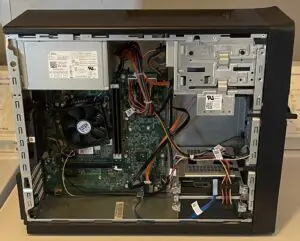
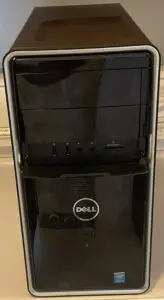
The Dell Inspiron 3847 is not a modern computer, and it doesn’t need to be.
With a 3.7 GHz i3-4170, 8 GB of DDR3, Intel HD 4400 graphics, and a 1 TB hard drive, it won’t compete with a current desktop. For browsing, word processing, WordPress, basic streaming, and old-school gaming, that doesn’t matter.
The refurb required a cleaning, a hardware check, a fresh Windows installation, and a test drive.
- No SSD.
- No extra RAM.
- No unnecessary upgrades.
Sometimes refurbishing an old computer isn’t about making it fast. It’s about making sure the existing hardware is clean, stable, and still good enough for the job.