


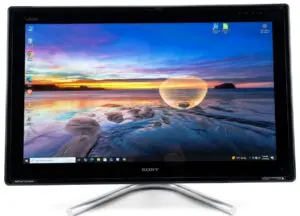
Sony Vaio 24″ VPCL222FX Win 10 ~ functions as a PC doubles as a Monitor for Game Consoles, VCR, DVD, Blu-ray (HDMI in and Out, Composite video In).
- i3-2310M 2.1GHz
- 8gb DDR3 12800
- 1TB HDD
There’s something deeply satisfying about taking an aging all-in-one PC and turning it into a sleek, functional centerpiece again. Recently, I got my hands on a Sony VAIO VPCL222FX—a 24-inch all-in-one from an era when manufacturers were still experimenting with blending home entertainment and computing into one elegant machine.
What makes this model especially interesting isn’t just its design—it’s the way it doubles as both a full Windows PC and a standalone media display. With a bit of cleanup, a modern OS install, and some tuning, it becomes surprisingly useful even today.
A Beautiful Machine, even by modern standards
The VPCL222FX doesn’t look like a relic. Its large 24-inch display, glass front, and solid stand give it a premium feel even by modern standards. Unlike many all-in-ones, it was clearly designed with multimedia in mind.
Key standout hardware features:
- 24″ Full HD display (1920×1080)
- Built-in touch screen
- HDMI input (this is where things get interesting)
- Integrated speakers tuned for media use
Even before powering it on, you can tell this was meant to be more than just a PC.
Step 1: Cleaning and Physical Restoration
Before even thinking about software, I gave the unit a proper physical cleanup.
Exterior
- Microfiber cloth + isopropyl alcohol for the screen and bezel
- Compressed air for vents and speaker grilles
- Careful cleaning around the touch surface (no harsh chemicals)
Interior
- Blew out dust from fans and heatsinks
- Replaced thermal paste
- S.M.A.R.T. tested HDD
Step 2: Upgrading for Usability
Out of the box, this system likely came a mechanical hard drive and only 4gb RAM.
Upgraded Ram and HDD
- Swapped HDD for larger 7200rpm 1tb drive (was only 500gb) but skipped upgrading to SSD as current prices are out of hand → SSD (would have given a huge performance boost)
- Upgrade RAM from 4gb to 8gb
Step 3: Installing Windows 10
Despite its age, the VPCL222FX handles Windows 10 surprisingly well.
Installation notes:
- Used a standard Windows 10 USB installer
- After installation and Windows Updates, ran Snappy Drivers for any devices that weren’t updated
Step 4: The Hidden Gem in this system is the — HDMI and Composite Input Mode
This is where this VAIO becomes something special.
Unlike most all-in-ones, this machine includes an HDMI input, not just output, and Composite RCA inputs. That means you can use the display as a standalone monitor. You can use the “Monitor” mode when the computer itself is running, asleep, or off.
How it works:
- Plug in a device (streaming stick, console, another PC)
- Use the hardware input button to switch modes
- The VAIO becomes a pure display + speaker system
Why this is awesome:
- Turns the unit into a secondary monitor for another PC
- Perfect for retro consoles or streaming devices
- Functions like a TV without needing the OS running
This dual-purpose design is rare—and incredibly practical.
Step 5: Optimizing for Modern Use
To make this system practical in 2026, I focused on lightweight and media-friendly usage.
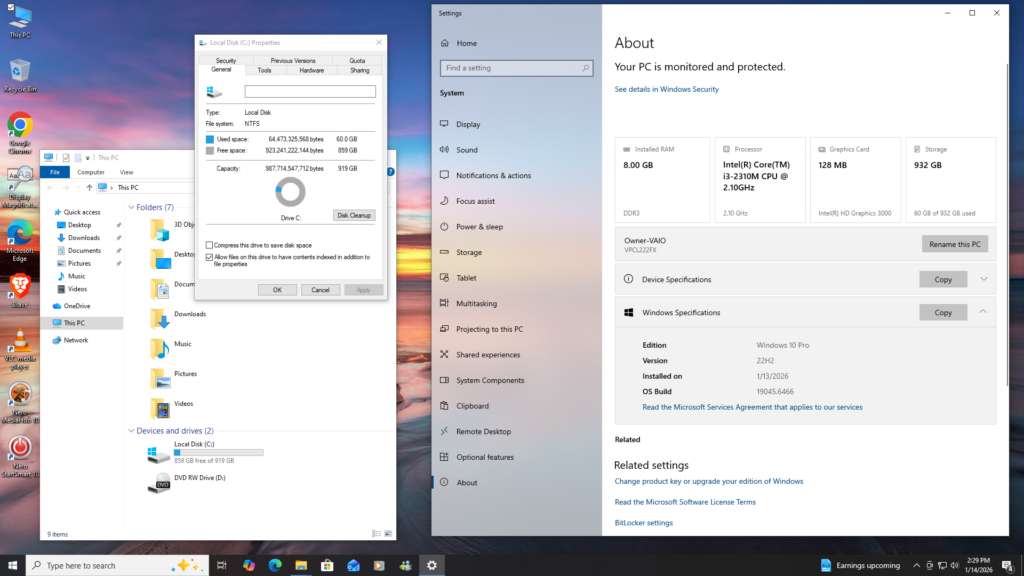
How I setup this system:
- For use as a media hub (YouTube, streaming, local video)
- Installed a Brave Browser
- Disabled unnecessary startup apps
- Set power plan to balanced
Final Thoughts
Restoring this Sony VAIO VPCL222FX wasn’t about raw performance. It was about refurbishing a unique piece of hardware that still has a place today.
Its combination of:
- Large, high-quality display
- Built-in touch functionality
- Inputs for external media devices
…makes it far more versatile than most old PCs.
With a little effort, this machine went from outdated to genuinely useful—a hybrid between a computer, a monitor, and a media center.
And honestly? That’s something modern systems don’t always get right.