


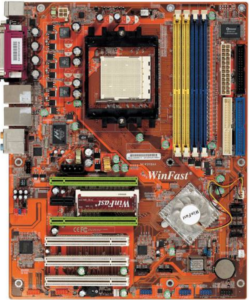
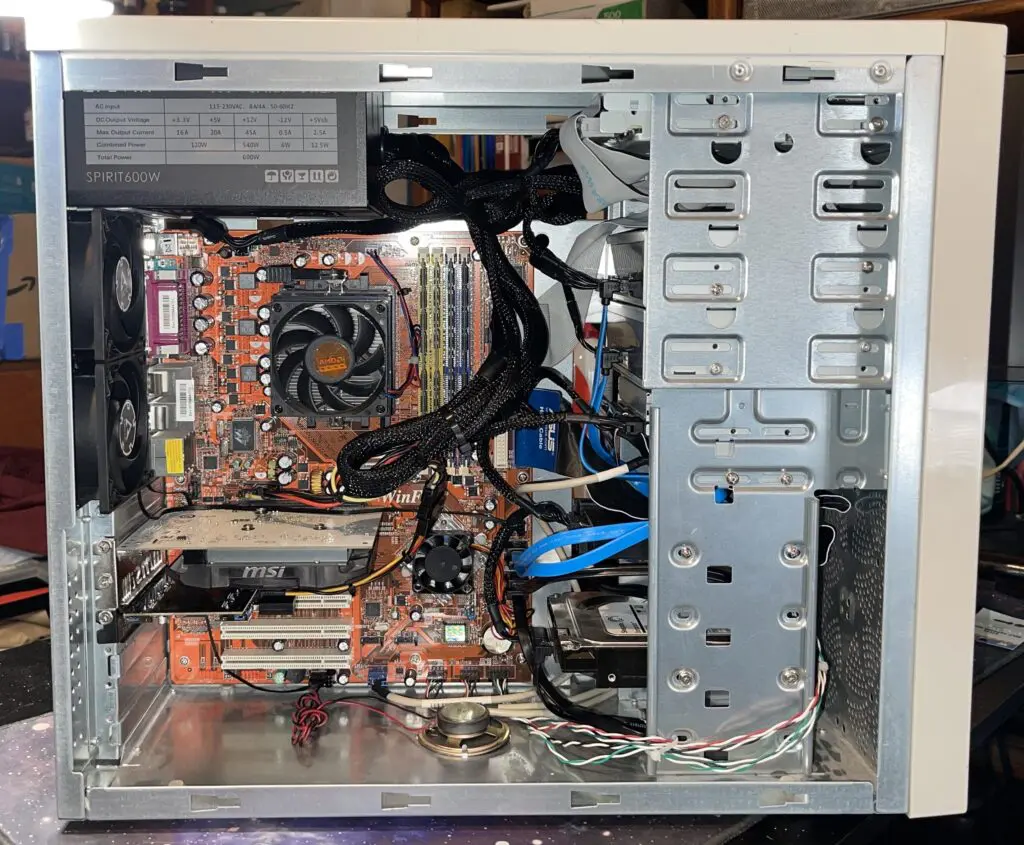
Some old motherboards are worth keeping simply because they are unusual. The Foxconn WinFast NF4SK8AA-8EKRS is one of those boards—and it cost $10. It wasn’t found in an anti-static bag or carefully stored in a box. It came from a yard sale, still installed in an old case, with a video card bouncing around loose inside. For ten bucks, it was worth the gamble.
Inside was a surprisingly well-equipped Socket 939 motherboard built around the NVIDIA nForce4 SLI chipset. The NF4SK8AA-8EKRS comes from a period when manufacturers were still putting an impressive amount of hardware onto a single PCB: two EIDE channels, dual-channel DDR, a 5.25-inch floppy interface, four SATA ports, dual Gigabit Ethernet, NVIDIA storage and networking, and a separate Silicon Image SATA controller with two additional SATA ports. A Marvell Gigabit controller provides the second network interface. For a modern PC, much of that is irrelevant. For a retro system, it’s gold.
The Reason for Keeping It
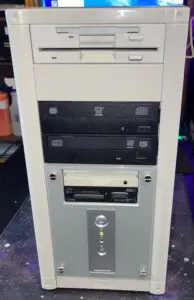
The goal wasn’t to build the ultimate Socket 939 retro-mod gaming machine. The goal was data recovery. An Iomega 250 MB EIDE drive needed to be accessed, along with data stored on 5.25-inch floppy disks. Modern PCs have largely abandoned both interfaces, making a motherboard with native support for this hardware considerably more useful than its age would suggest. That made the rather battered $10 yard-sale discovery worth resurrecting.
Of course, resurrecting a twenty-year-old enthusiast motherboard rarely means simply pressing the power button. Before applying power, there are capacitors to inspect, traces and connectors to check for corrosion or damage, jumpers and voltage settings to verify, and the power supply and its connections to test. Once it is powered, the POST sequence, memory, CPU, chipset, expansion slots, storage interfaces, USB, onboard audio and networking all need to be checked. With hardware this old, getting it to start is only the first milestone—the real test is determining whether all of the board’s functions still work reliably.
The nForce4 Fan Problem
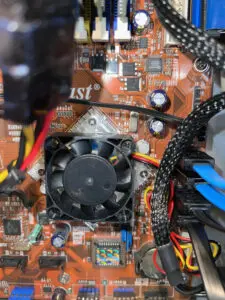
The first problem was the chipset fan. The original nForce4 cooler uses an unusual arrangement: rather than mounting a conventional square fan on top of the heatsink, the fan is recessed into a rounded chamber in the heatsink. Tiny Phillips-head screws with pointed tips thread directly into the aluminum. Replacement fans are easy enough to find; replacement fans that actually fit are another matter. Modern 40 mm fans generally use a conventional square frame, while the original fan effectively disappears into the heatsink. The replacement sits approximately 1/4 inch higher.
That doesn’t automatically make the replacement unsuitable. It still blows downward onto the heatsink, but the increased distance allows some air to escape around the edges instead of directing everything through the fins. It’s a minor compatibility problem that tends to disappear from specifications and only becomes obvious when restoring hardware this old.
Getting the PCI Express Slots Working
The next problem involved the expansion cards. A GeForce GT 730 was needed for video, while a PCIe x1 USB 3.0 controller was needed to provide modern connectivity. Unfortunately, the chipset fan occupies enough space to interfere with the nearby x1 slot. The board has a second physical x16 slot, but it initially appeared to be inactive.
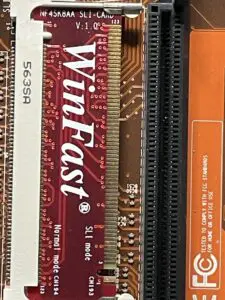
The Foxconn WinFast NF4SK8AA manual turned out to be the key. The NF4SK8AA uses a small WinFast configuration module to determine how the two physical x16 slots are configured. In the normal SLI position, the second slot isn’t available in the desired configuration. Flipping the module from the normal SLI position to the PCI Express configuration activates the second physical x16 slot and changes the lane arrangement to x8. The resulting configuration puts the GT 730 in the primary x16 slot and the USB 3.0 controller in the second physical x16 slot, leaving the obstructed x1 slot unused. A motherboard designed around SLI graphics cards ends up using its second x16 slot for a USB controller instead—not exactly what NVIDIA had in mind.
The Driver Hunt
With the hardware configured, Windows XP still had to recognize everything. The board combines controllers from several manufacturers, including NVIDIA nForce4, Marvell networking, Silicon Image SATA, and Realtek audio. The original Foxconn driver disc would have been the obvious answer twenty years ago, but locating a complete collection of working drivers today is considerably less convenient.
The latest Snappy Driver Installer package proved useful for filling in the gaps and getting the remaining hardware recognized. For a retro build, driver availability can be just as important as hardware compatibility. A perfectly functional controller isn’t much use when the operating system has no idea what it is.
Why Keep a Socket 939 Board Alive?
Because this isn’t really about Socket 939. It’s about having the right machine for the right job. A modern PC can be vastly faster, smaller, quieter and more convenient, but it can also lack the interfaces needed to access hardware that was completely ordinary when the NF4SK8AA was new.
The NF4SK8AA-8EKRS occupies an interesting point in PC history, with one foot in the old world—floppy, EIDE and legacy expansion—and another in the emerging world of PCI Express, SATA, Gigabit Ethernet and dual-channel DDR. That makes it an unusually useful retro platform.
Considering that it started life as a $10 yard-sale find sitting in an old case with a video card rattling around loose, the fact that it can now serve as a bridge to an Iomega 250 MB drive and a stack of 5.25-inch floppies makes the gamble look pretty good. Sometimes the interesting hardware isn’t the hardware being actively sought. Sometimes it’s the motherboard sitting in a junky old case at a yard sale for ten bucks, waiting to be noticed.