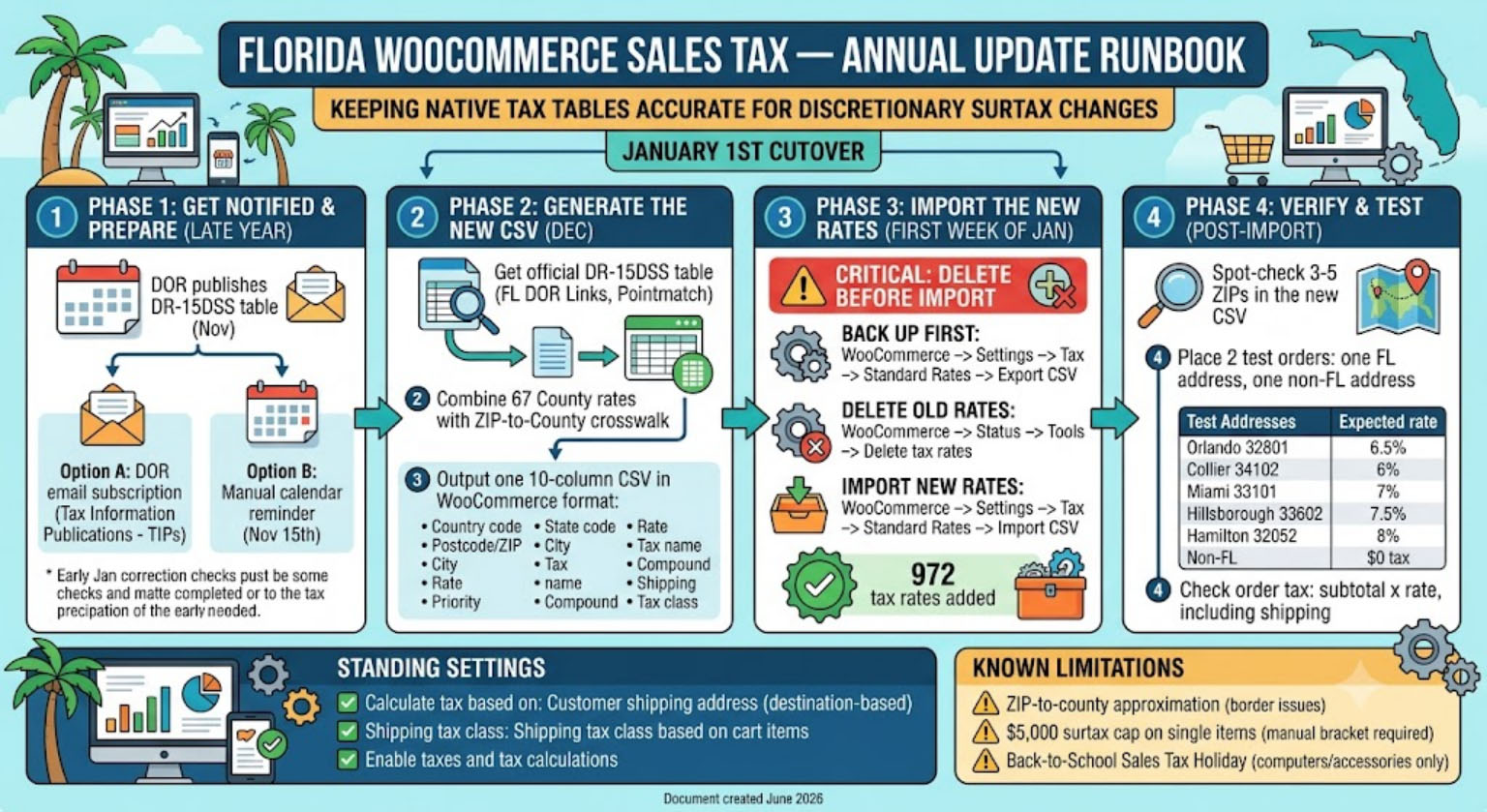
Purpose: Keep the store’s native WooCommerce tax tables (no third-party plugin) accurate as Florida’s county discretionary surtax rates change. Surtax rates can only change on January 1st by law, so this is a once-a-year task.
Quick Checklist
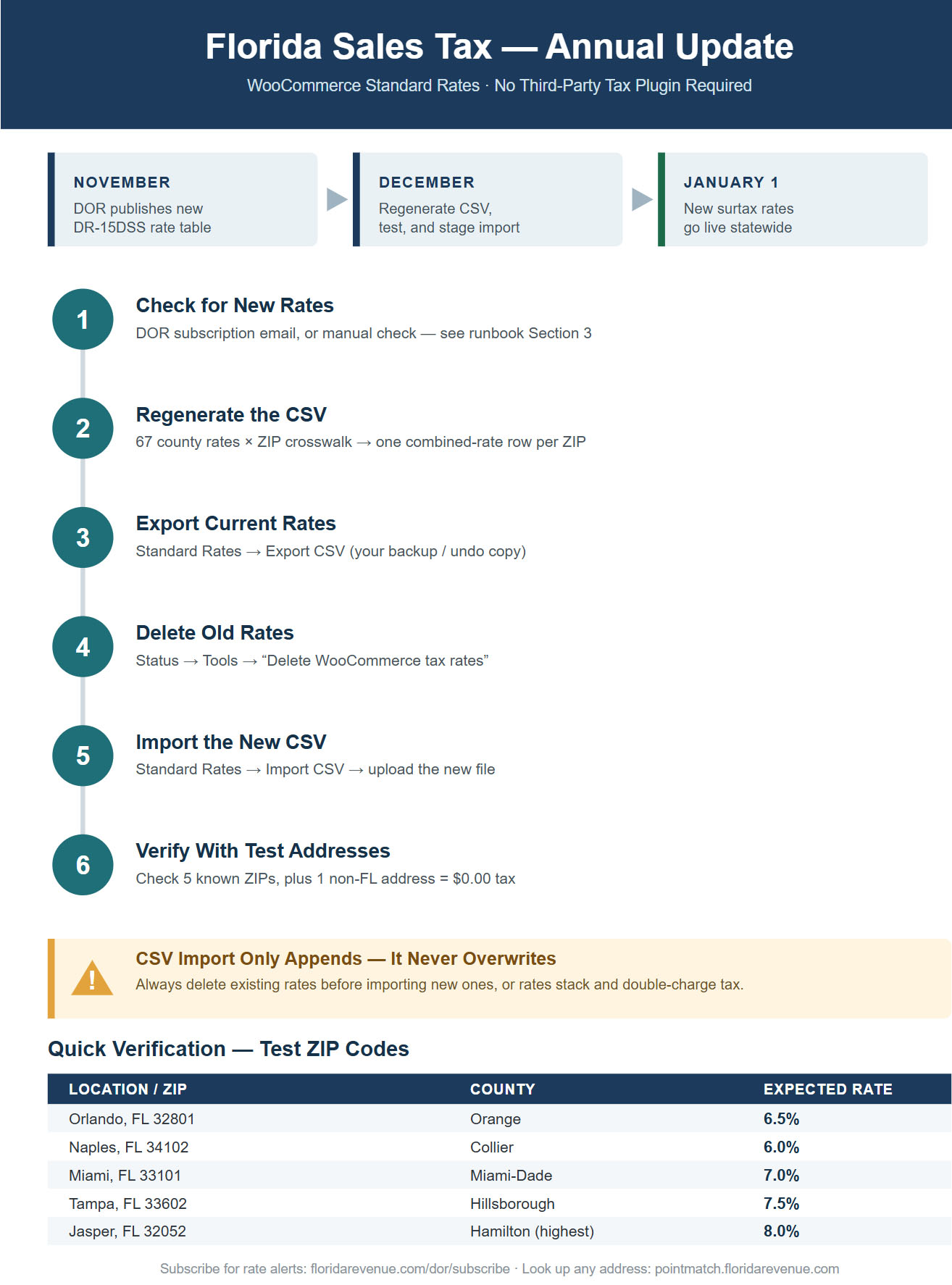
- Regenerate the ZIP-level rate CSV from the new table
- Check for new DR-15DSS (DOR subscription email, or manual check if not subscribed — see Section 3)
- Spot-check the new CSV against 3–5 known ZIPs
- Export current live tax rates as a backup
- Delete existing tax rates (WooCommerce → Status → Tools)
- Import the new CSV (WooCommerce → Settings → Tax → Standard Rates)
- Place 2 test orders (one FL address, one non-FL address) to confirm
- Done — re-check in ~11 months
Annual Timeline
| When | What happens |
|---|---|
| Mid-November | Florida DOR publishes the next year’s Form DR-15DSS (“Discretionary Sales Surtax Information”) covering all 67 counties. |
| Early-to-mid December | Pull the new table, regenerate the CSV, test it on a staging copy if possible. |
| First week of January | DOR has occasionally issued a correction to the table shortly after Jan 1 (happened for 2025). Worth a second glance before fully trusting the new numbers. |
| January 1 | New surtax rates legally take effect — this is the hard cutover date. |
Where to Get the Official Rates
Ask Claude or another AI to pull the CSV for you, so you don’t have to worry about locating the correct tax rate schedule yourself.
Florida Tax Rate Schedules
- Florida DOR Forms Library (search “DR-15DSS”):
https://floridarevenue.com/forms - Direct PDF pattern (year changes annually):
https://floridarevenue.com/Forms_library/current/dr15dssXX.pdf - Official online rate table (alternative to the PDF): https://pointmatch.floridarevenue.com/General/DiscretionarySalesSurtaxRates.aspx
- Florida’s address/ZIP lookup tool (for spot-checking specific addresses):
https://pointmatch.floridarevenue.com/
Get email alerts automatically: subscribe at https://floridarevenue.com/dor/subscribe — sign up for Tax Information Publications (TIPs), which is the category the annual surtax table falls under.
One-Time Setup: Getting Notified Each Year
Pick one of these (or both):
- Go to https://floridarevenue.com/dor/subscribe
- Enter your email
- Check the box for Tax Information Publications (TIPs)
- Confirm via the email DOR sends
⚠️ Heads up: TIPs cover all Florida tax topics (corporate income, fuel, communications tax, etc.), not just sales tax surtax — you’ll get more emails than just the one you care about. Each November, skim subject lines for “Discretionary Sales Surtax” or “DR-15DSS” rather than expecting a dedicated, isolated alert.
Option B — Manual calendar reminder (more reliable, no inbox noise)
- Put a recurring annual reminder on your own calendar for November 15th: “Check floridarevenue.com/forms for new DR-15DSS.”
- This doesn’t depend on a government mailing list staying reliable, and is arguably the safer fallback even if you also do Option A.
Regenerating the CSV
The store’s tax table is one row per Florida ZIP code, each carrying that ZIP’s county’s combined rate (6% state + that county’s surtax). To rebuild it for a new year:
- Get the new DR-15DSS table (see links above) and note each county’s total surtax rate (some counties stack two surtaxes — DR-15DSS lists each separately with a combined total at the top of the entry; use the total).
- Combine those 67 county rates with a ZIP→county crosswalk to produce one row per ZIP.
- Output as a CSV with these exact 10 columns (WooCommerce’s required import format):
Country code,State code,Postcode/ZIP,City,Rate,Tax name,Priority,Compound,Shipping,Tax class
Example row:
US,FL,32801,,7.0000,FL Sales Tax,1,0,1,
Easiest path: send the new year’s DR-15DSS to Claude and ask it to regenerate the CSV the same way it was built originally — it’s a quick turnaround.
Importing the New Rates
⚠️ Critical: WooCommerce’s CSV import only adds rows — it does not overwrite or update existing ones. Importing a new year’s rates on top of the old ones without deleting first will leave two rates per ZIP active at the same priority, which stacks and double-charges tax. Always delete before importing.
Step by step:
- Back up first:WooCommerce → Settings → Tax → Standard Rates → click Export CSV. Save this somewhere dated (e.g.
fl-tax-rates-2026-archive.csv) in case you need to reference or roll back. - Delete the old rates:WooCommerce → Status → Tools tab → find “Delete WooCommerce tax rates” → click it. This wipes the Standard Rates table in one click.
- Import the new rates:WooCommerce → Settings → Tax → Standard Rates → Import CSV → select the new year’s file → Upload file and import.
- Confirm the success message (should read something like “972 tax rates were added” — the exact count may shift slightly year to year if Florida adds/retires a ZIP).
Verification — Test Addresses
ZIP code is all that matters for the rate match (street number is irrelevant). Use these to confirm each rate tier is wired correctly after import:
| Test case | Address | County | Expected rate |
|---|---|---|---|
| Quick single check | Orlando, FL 32801 | Orange | 6.5% |
| No-surtax county | Naples, FL 34102 | Collier | 6.0% |
| 1% surtax county | Miami, FL 33101 | Miami-Dade | 7.0% |
| 1.5% surtax county | Tampa, FL 33602 | Hillsborough | 7.5% |
| Highest in the state | Jasper, FL 32052 | Hamilton | 8.0% |
| Out of state (sanity check) | Any non-FL address | — | $0.00 tax |
Note: county-to-rate mapping shifts slightly year to year as surtaxes expire or new ones are voted in — re-verify which counties sit at which tier against the current DR-15DSS rather than assuming this table stays the same forever.
Order-level check: place a real test order. Tax should be: (subtotal) × (rate for that ZIP), applied to both product subtotal and mandatory shipping (Shipping is set to 1 in the CSV, since Florida taxes mandatory shipping charges). If shipping isn’t being taxed and should be, check WooCommerce → Settings → Tax → Tax options → Shipping tax class is set to “Shipping tax class based on cart items”, not “None.”
Standing Settings (set once, shouldn’t need to touch annually)
WooCommerce → Settings → Tax → Tax options:
- Calculate tax based on: Customer shipping address (required — Florida is destination-based)
- Shipping tax class: Shipping tax class based on cart items
WooCommerce → Settings → General:
Known Limitations (don’t need to re-solve these every year, just keep in mind)
- ZIP-to-county approximation: A handful of ZIPs straddle county lines. The ZIP-level table is an approximation — even Florida’s own DOR lookup tool notes true precision is street-address-level. Spot-check border-area ZIPs against https://pointmatch.floridarevenue.com/ if a customer ever disputes a charge.
- $5,000 surtax cap on single items: Florida only applies the county surtax portion to the first $5,000 of a single tangible-property item — the 6% state portion applies to the full price regardless. WooCommerce’s flat per-ZIP rate can’t apply this bracket automatically. Only relevant if a single SKU or bundle is priced above $5,000; otherwise ignore.
- Back-to-School Holiday (computers/accessories only): Florida runs an annual back-to-school sales tax holiday exempting “personal computers and computer-related accessories” ≤$1,500/item for a window in summer (dates vary year to year, dealers can’t opt out). This only applies if the catalog ever expands into computers, tablets, keyboards, monitors, routers, etc. — not relevant to general electronics that don’t fall in that defined category.
Document created June 2026 for the initial Florida tax setup. Update the timeline/links section if Florida DOR changes its publication schedule or URL structure in future years.